Ever sat down to plan a shoot and just... stared at the screen? We've all been there. The "blank page" problem is real, especially when you're juggling creative vision with technical logistics.
That’s exactly why Cue Director exists.
Cue Director isn't just a basic AI tool; it’s a production-aware creative assistant powered by Apple Intelligence. It’s designed to take a simple idea and expand it into a professional, multi-layered production plan that covers everything from your opening hook to the final payoff.
How to Access Cue Director
Cue Director is purposefully integrated into your existing project management flow, so it’s always just a tap or keystroke away.
- On iPhone & iPad: Open any folder (or "All Projects") and tap the ellipsis (...) menu in the top-right corner. You'll find Cue Director listed right there.
- On Mac: Use the power-user shortcut Cmd + Shift + D to instantly summon the Director from any project list view.
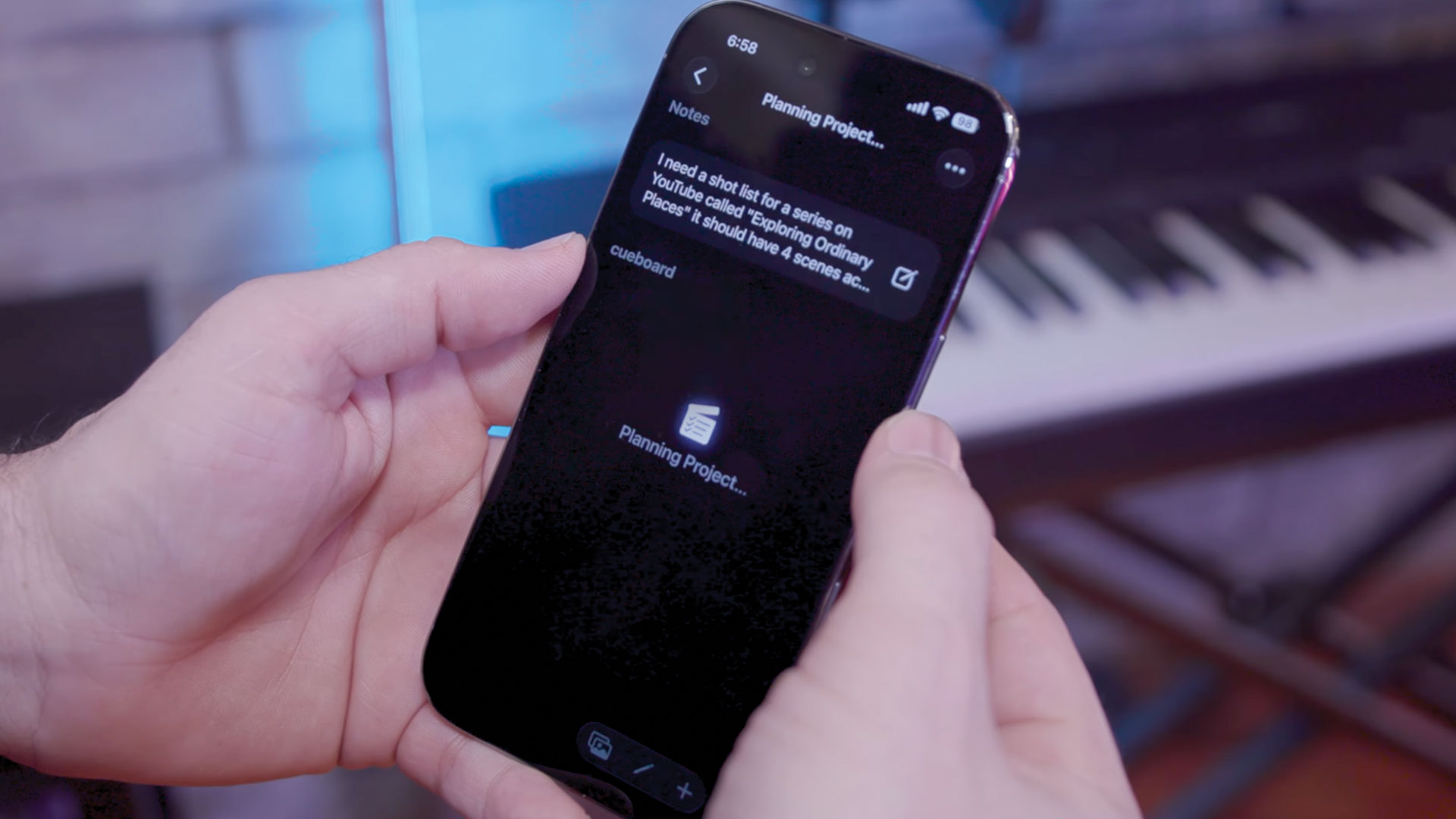
After that, simply type an idea to get a shot list.
Watching the Magic Happen (Literally)
Once you tap "Direct," Cue Director doesn't just work in the background; it puts on a show. You'll be automatically navigated into your new project where you'll see the pulsing Cueboard logo at the top, signifying that the Director is actively planning your shoot.
One of the coolest things about Cueboard is that it doesn't make you wait behind a loading spinner. The app starts streaming the project directly into your list.
You’ll see the title being refined and shot sequences appearing in real-time. It’s like watching a DP and an Assistant Director plan your shoot on a whiteboard right in front of you. You can see the structure taking shape:
- Major Sequences: The Director organizes your project into logical beats (like Setup, Development, and Peak Moments).
- Nuanced Details: Under each sequence, it generates specific shots, suggesting camera angles and technical notes.
Professional Pacing and Structure
The Director doesn't just give you a list of shots; it builds a narrative. It understands that a great video needs pacing. When you use Cue Director, you’ll notice it organizes your project into logical phases:
- Establishing the Scene: Suggestions for wide shots or location-setters.
- The Core Action: Focused shots that capture the heart of your subject.
- Supporting Detail: B-Roll, close-ups, and alternative angles that add depth to your edit.
- Wrap-up & Payoff: Ending sequences that bring your story to a satisfying conclusion.
It’s about turning a loose idea into a structured production plan that actually makes sense when you get into the editing room.
On-Device, Private, No Subscription
In an era of cloud-based everything, Cue Director stands apart by being completely on-device. Because it’s built on Apple Intelligence, your creative ideas never leave your iPhone, iPad, or Mac.
The processing happens locally, ensuring that your scripts and concepts remain yours and yours alone. It’s fast, it’s secure, and it works even when you're shooting in remote locations without a cellular signal.
Even better than that, enjoy unlimited use. There is no subscription required to use Cue Director, so you can take advantage of unlimited generations.
Tips for Best Results
While Cue Director is incredibly smart, you can get even better results by following a few simple tips:
- Go Deep with Prompts: Don't be afraid to use the full 5,000 character limit. Paste in your rough ideas, scripts, or location notes; the more context the Director has, the better the plan.
- Mention your gear: If you tell the Director you have a drone or need aerial shots, it will help influence the sequences.
- Define the vibe: Using words like "cinematic," "fast-paced," or "vlog-style" will affect the pacing of the generated cues.
- Use it as a starting point: Think of the Director's output as a high-quality "first draft." Once it's generated, you can easily drag shots around, edit the text, or add your own personal touches.
The Bottom Line
Cue Director removes the friction of starting. It turns a "maybe" into a plan, and a plan into a finished video. Whether you're a YouTuber planning your next tutorial or a filmmaker sketching out a short film, the Director is there to handle the structure so you can focus on the creativity.
Ready to see what the Director can plan for you? Open Cueboard on your Mac or iOS device and start your next project with a pulse of inspiration.